
YourClaw Pro
A Desktop Client for Open-Source AI Tools
Run open-source AI tools locally with a simple desktop interface.
No cloud services. No proprietary AI models.
This is a desktop software tool. Users are purchasing software only. No AI services, AI models, or third-party AI access are included.
YourClaw Pro is an independent desktop product built for OpenClaw users. It is not affiliated with, endorsed by, or operated by the OpenClaw open-source project unless explicitly stated.
Running Open-Source AI Tools Should Be Simple
Setting up open-source AI frameworks can be complex and time-consuming. YourClaw Pro provides a simplified desktop interface that helps users install, manage, and run these tools locally.
Without Yourclaw
Running open-source AI frameworks on your own machine usually means:
$ git clone openclaw && cd openclaw
$ docker compose up
ERROR: port 5432 already in use
$ pip install -r requirements.txt
ERROR: python 3.9 required, found 3.12
Build failed. 14 errors.
With YourClaw Pro
A simplified desktop interface for local tools.
Built for Data-Driven Professionals
5 Core Features, Out-of-the-Box
YourClaw Pro provides a unified desktop interface for managing open-source AI tools, local workflows, scheduled tasks, and provider configuration on your own machine.
Unified Desktop Interface
YourClaw Pro provides a smooth desktop experience with rich Markdown rendering, precise task controls, and clear real-time progress feedback.
 Run multiple tasks at once with seamless switching. Conversation history is stored locally for permanent reference.
- Code blocks, tables, and formulas render automatically so complex output stays readable at a glance.
- Built-in workflow status monitoring lets you go beyond simple chat and stay in control of every step.
- Designed as a secure desktop utility for developers, researchers, and creators to boost daily productivity.
Scenario Example
Switch between active tasks in one interface, review locally stored history, and monitor each workflow in real time without losing context.
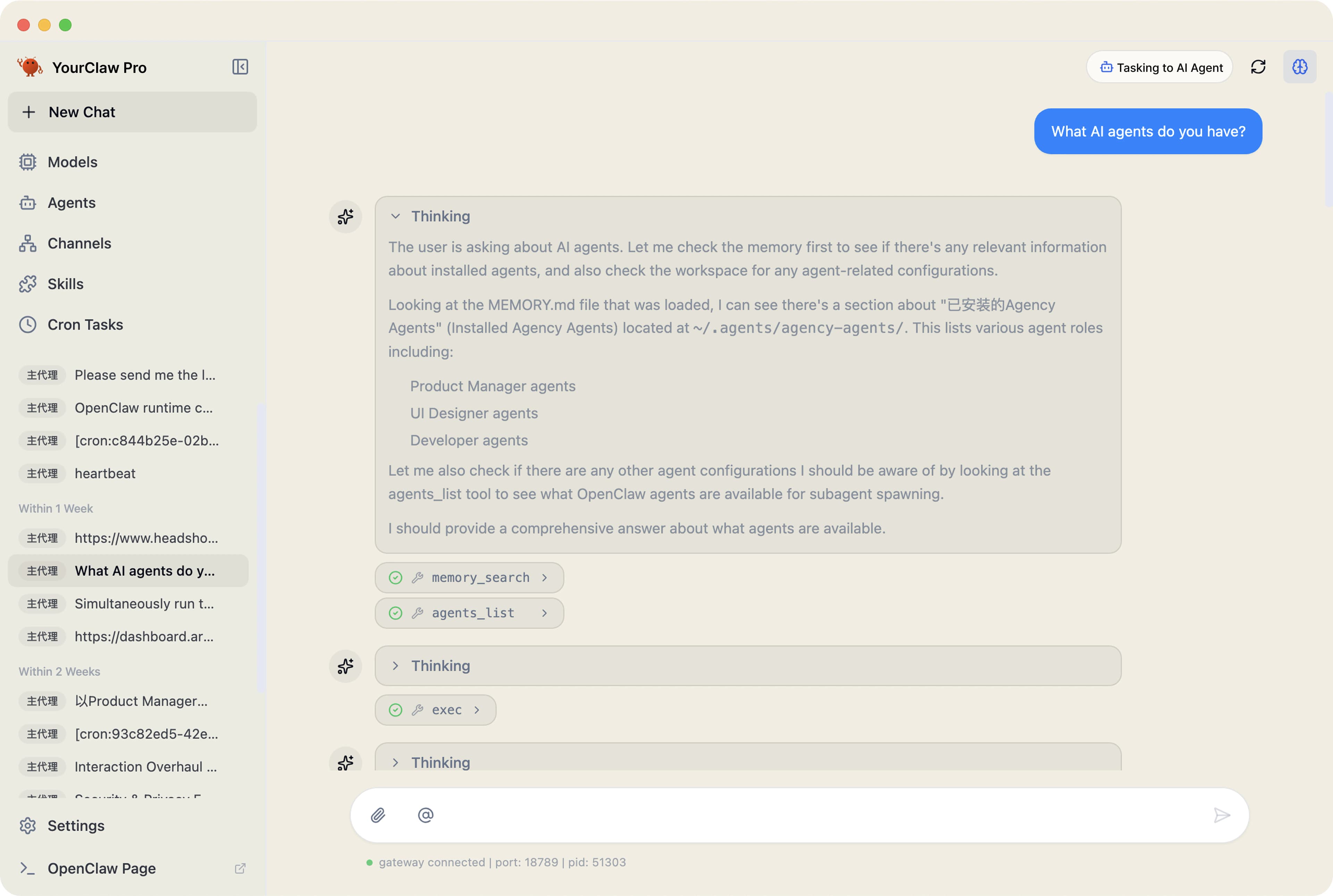
Local Workflow Management
Configure and run multiple independent local workflows side by side. Set up specialized configurations for different topics and tasks instead of relying on one general-purpose chat.
 Isolated runtime: Customize the model, prompt, and tool set for each channel, so each workflow stays focused on its job.
- Visual dashboard: See the status and progress of every workflow in real time.
- Specialized setups: Translation, research, analysis, and other repeatable tasks each get their own dedicated configuration.
- Every action is transparent. You maintain full oversight and authorization over all local automations.
Scenario Example
Run a translation workflow, a research workflow, and an analysis workflow at the same time, each with its own model behavior and tool stack.
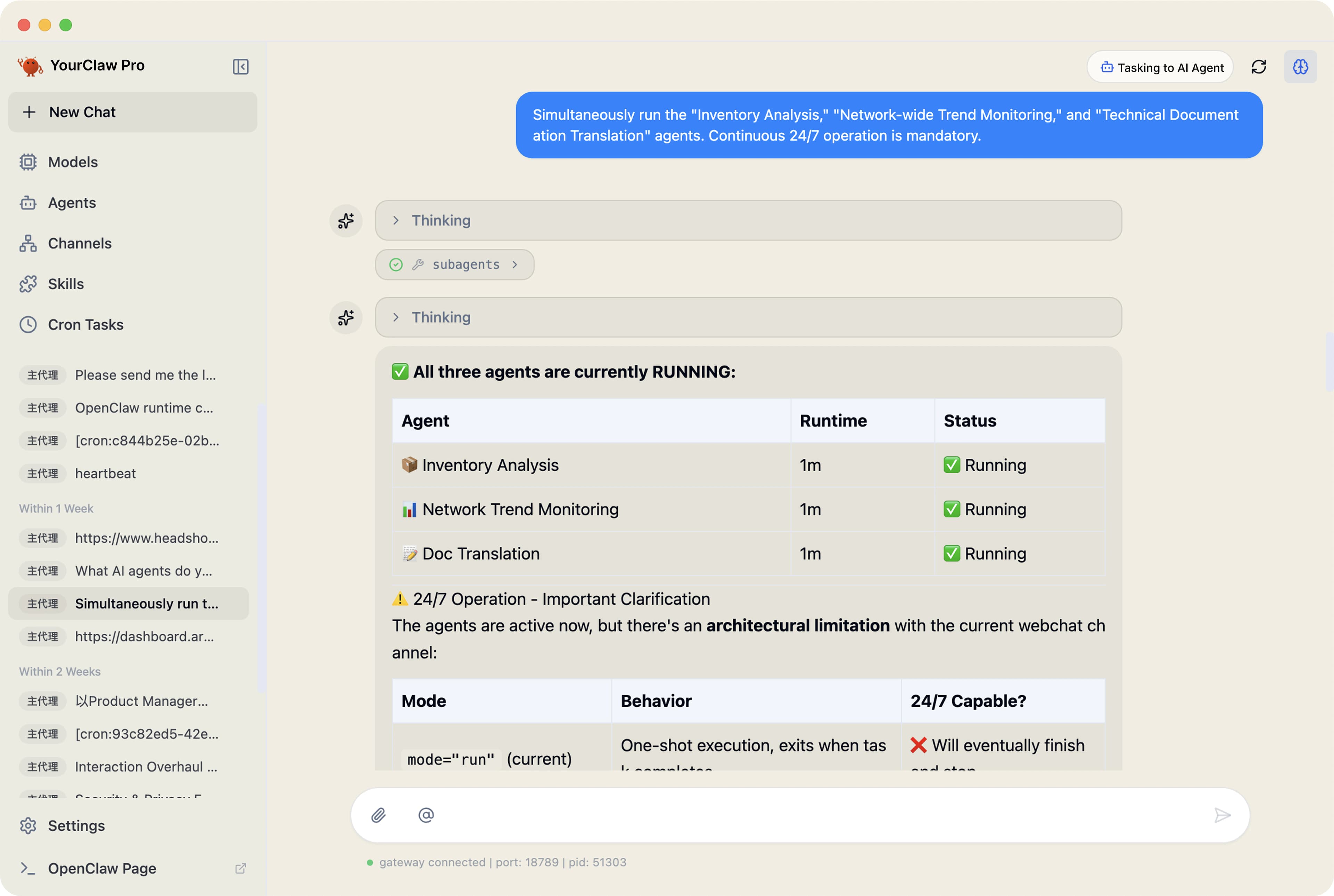
Scheduled Task Automation
Built-in scheduling lets you run tasks on a fixed cycle without manual intervention. Set up recurring workflows for routine information gathering or periodic reports.
- Flexible scheduling: minute, hourly, or daily cycles to fit your routine.
- Background execution: Once configured, scheduled tasks run quietly without needing your attention.
- Dynamic queue: Manage task priorities and conditions so the right work runs at the right time.
Scenario Example
Create a recurring workflow for updates, reports, or routine monitoring and let it keep running on a fixed cadence in the background.
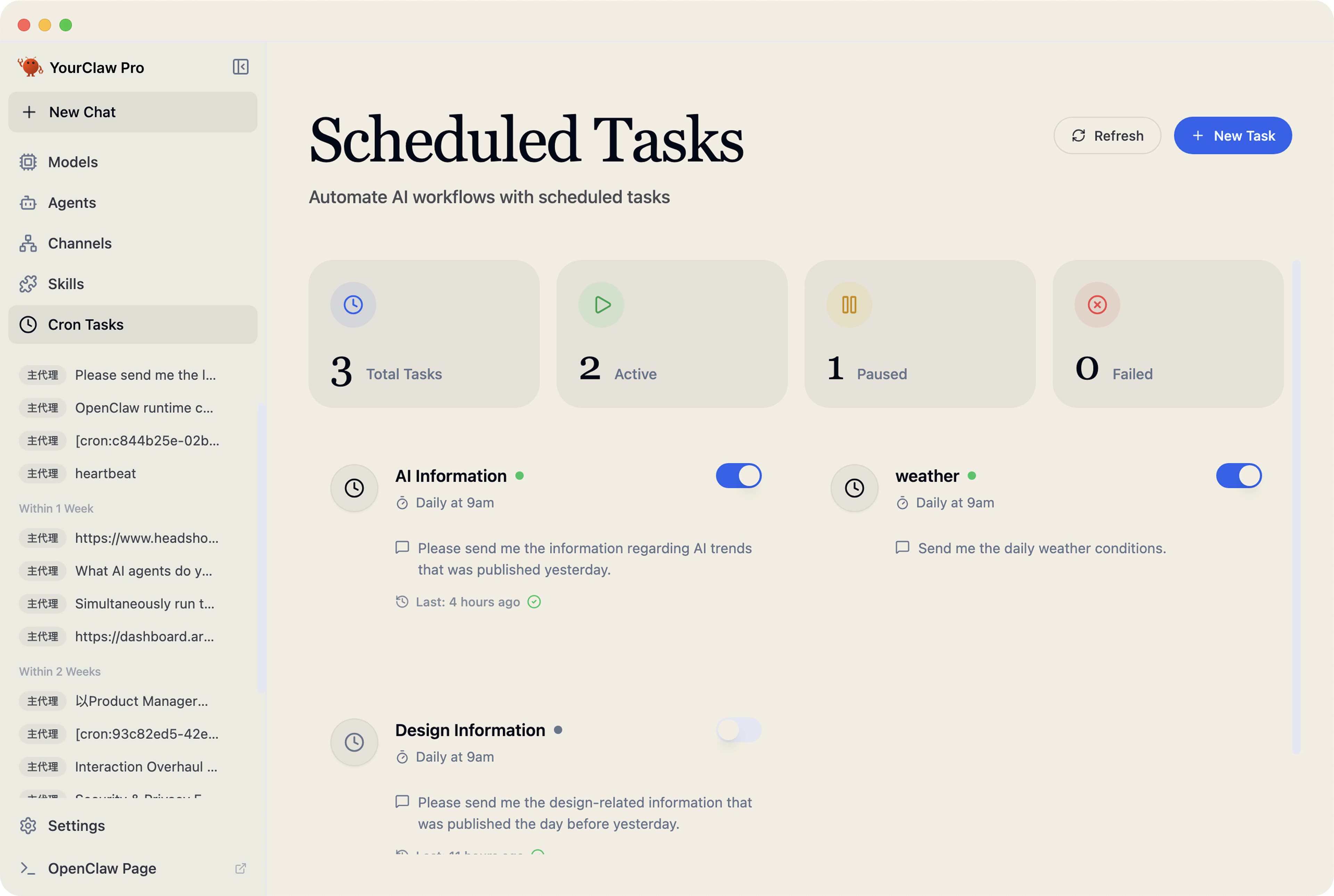
Pre-configured Tool Setup
A visual tool management interface helps you enable pre-configured integrations for search, computation, file operations, and more.
- Versatile plugin library: built-in tools for web search, image generation, code execution, and local file operations.
- Visual tool management: browse and configure tools through a clean interface; enable or disable each one as needed.
- Multi-step workflows: Tools are invoked based on your instructions to complete tasks that need several steps.
- Cross-language source processing: Convert international source material into your preferred language for easier review.
Scenario Example
Turn on the tools you need for search, file handling, and execution, then let the assistant combine them into longer task chains.
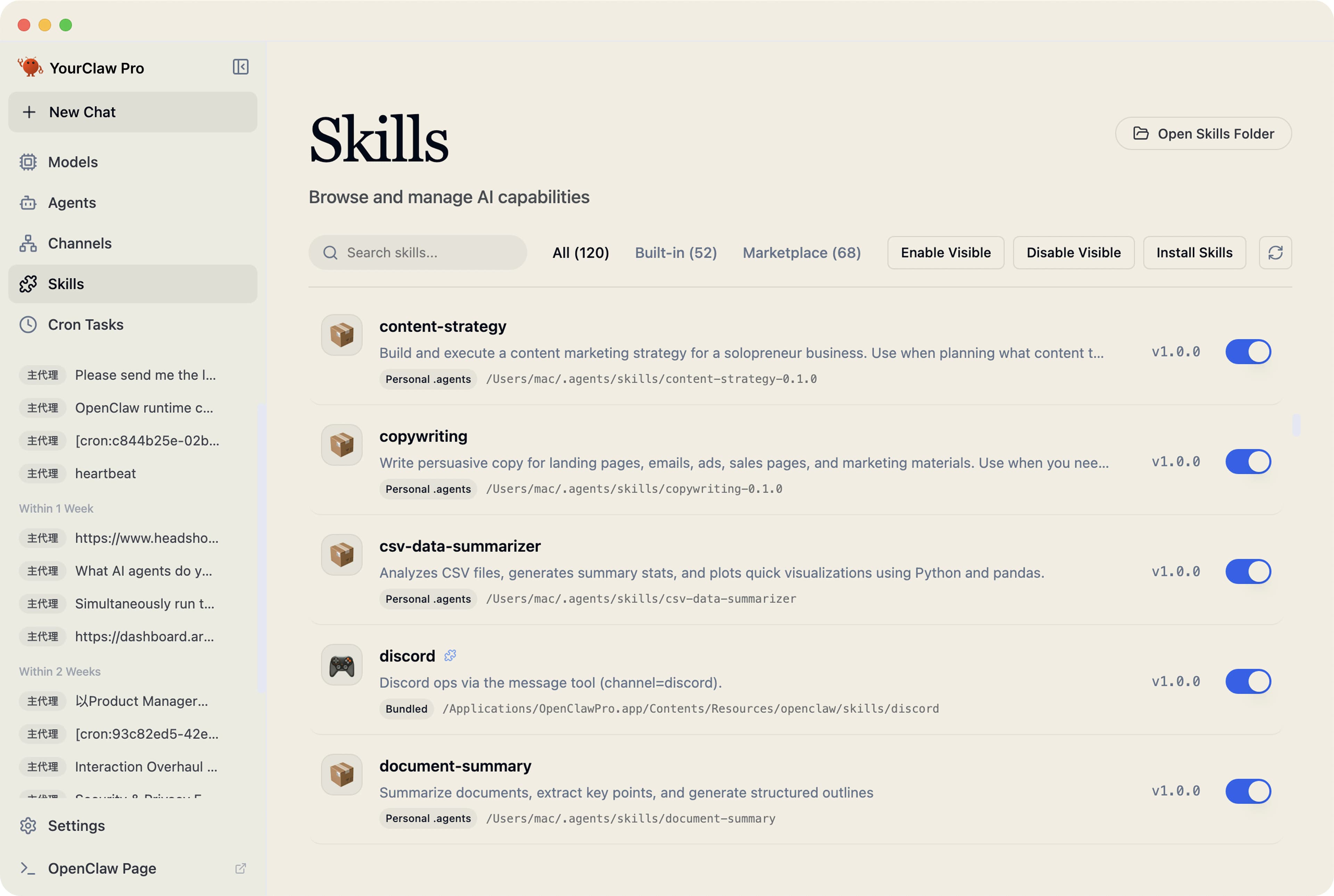
Privacy-First Storage
Your conversations and configuration stay on your machine. Local storage, system-level keychain protection, and clear control over what leaves your device.
- Encrypted key storage: All API keys are stored in your operating system's secure keychain.
- Provider flexibility: Use one interface to manage and route between multiple AI providers of your choice.
- Local data: Chat history and configuration files stay on your local machine. The app does not send your conversations to our servers.
- Your data never leaves your machine unless you explicitly connect a third-party API. Complete privacy for your workflows.
Scenario Example
Keep keys, history, and configuration on-device while deciding for yourself which external providers, if any, your workflows connect to.
More than just a research tool
A Local Workspace for Managing AI Tools
YourClaw Pro helps organize and run open-source AI tools in one place, without requiring cloud services or third-party platforms.
Workflow Efficiency
Knowledge and task management
Developer Tools
Developer workflow support
Multimedia Suite
Boost your content workflows
Voice & Smart Home
Voice and message-based home control
Communication
Multi-channel workflow helper
Security & Privacy
Securely manage provider credentials
MCP Protocol
Compatible with MCP tool services
Tool Marketplace
Compatible with leading open-source tool ecosystems
Quick Start Guide
Get Started in 3 Minutes
macOS & Windows · Visual interface · No coding required
Download & Install
Choose macOS or Windows, double-click to install, follow the setup wizard.
Configure Your AI Provider
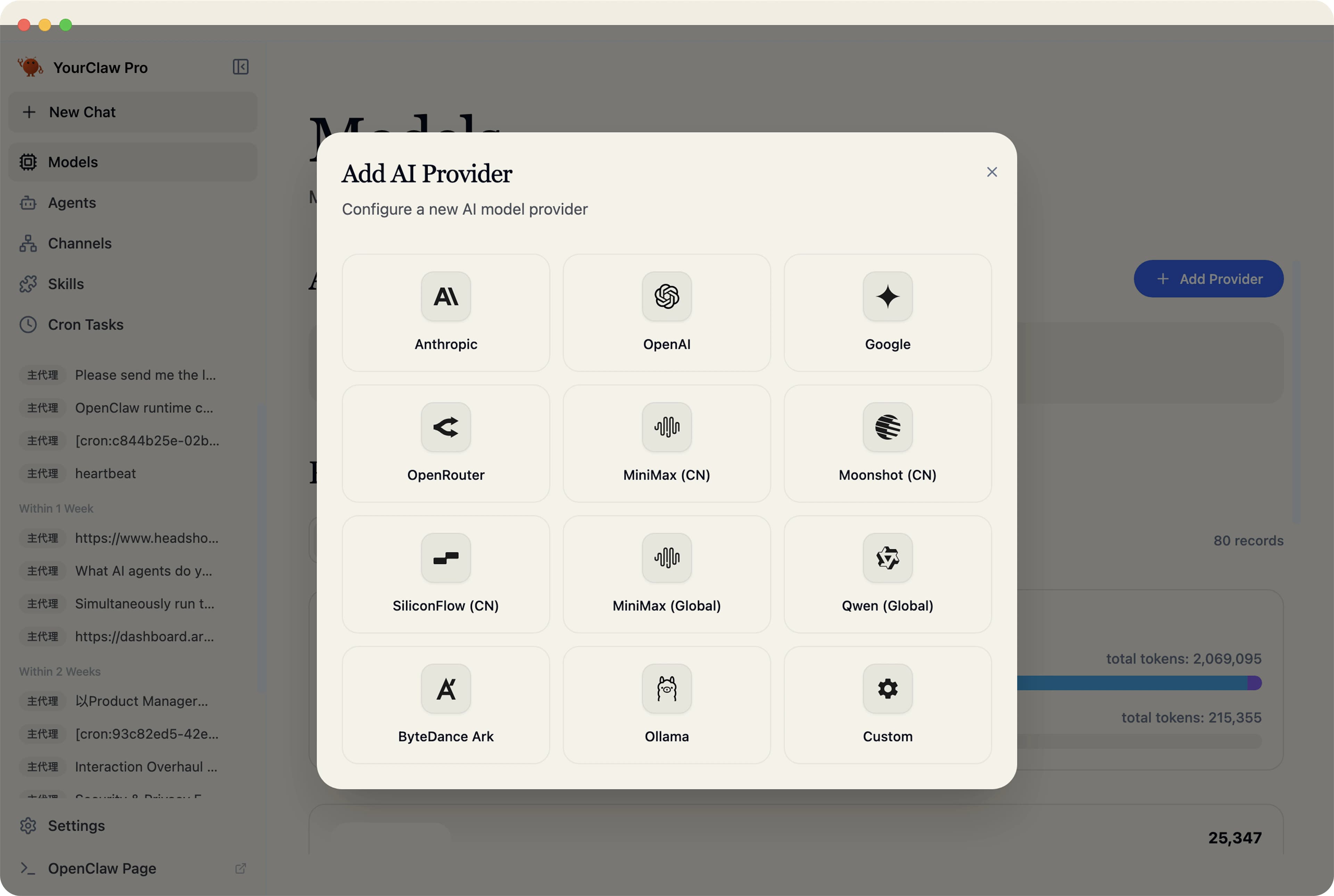
Pick a supported AI provider and enter your API key. Visual setup, no command line needed. Compatible with all major AI providers — bring your own API key.
Start Using It
Send instructions through chat or set up scheduled tasks. The assistant runs locally on your own machine.
Comparing Mainstream Solutions
Discover the Unique Advantages of YourClaw Pro
A comprehensive comparison with leading market solutions.
| Feature | YourClaw Pro (Recommended) | OpenClaw (Manual Setup) | Cloud Claw |
|---|---|---|---|
| Real-time Data Acquisition | Intelligent Research Assistant | Requires manual tool and source setup | Restricted to local knowledge |
| Continuous Operations | Your hardware, persistently online | Runs only after successful self-hosting | Prone to cloud disconnection |
| Multi-source Integration | 55+ skills, deeply integrated | Manual integrations and configuration | Single-platform architecture |
| Contextual Memory | Long-term dialogue with auto-memory | Depends on user-managed local setup | Basic chat history |
| Intelligent Analysis | Harvesting + Analysis + Pushing | Requires custom workflow configuration | Basic Reasoning Ability |
| Instant Alerts & Pushing | 20+ channels via graphical configuration | Requires manual channel setup | None |
| Data Security | Full local storage; open-source auditable | Local if self-hosted correctly | Cloud storage offers no privacy. |
| Learning Curve | Graphical interface; no coding required | Developer-oriented setup | Low |
| Cost Structure | One-time purchase; Free updates included | Free software; setup time required | Monthly subscription ($20–$79) |
Total Cost of Ownership: Cloud Claw vs YourClaw Pro
After 12 Months
Cloud Claw: $228–948
YourClaw Pro: $99
After 24 Months
Cloud Claw: $456–1,896
YourClaw Pro: $99
After 36 Months
Cloud Claw: $684–2,844
YourClaw Pro: $99
Pricing Plan
Desktop Software License
Downloadable desktop software for local installation and use.
$99
All features unlocked with a single purchase.
What you get:
- A downloadable desktop application
- One-time license (no subscription required)
- Local installation and usage
- Access to pre-configured open-source tool integrations
Local Tool Workspace
- Local workflows running on your computer
- Automatic task execution and analysis
- Long-context multi-turn conversations
- Structured reports and summaries
Visual Console
- Full desktop interface
- No command line needed
- Visual workflow management
- Real-time task monitoring
Multi-Workflow Support
- Run multiple workflows at the same time
- Assign different tasks to each workflow
- Independent context per workflow
Automation & Scheduling
- Built-in task scheduling
- Automatic information collection
- Trigger analysis automatically
- Notifications and alerts
Tool Ecosystem
- 50+ built-in tools
- One-click tool installation
- Expand via the tool catalog
- Combine tools into workflows
Provider Flexibility
- Compatible with supported providers
- Bring your own API key
- Switch providers as needed
- Centralized provider management
Multi-Channel Messaging
- Telegram integration
- Discord integration
- Slack integration
- iMessage and Teams support
Zero-Config Setup
- Guided installation process
- Automatic environment detection
- Visual provider configuration
- Get started in minutes
Privacy & Security
- Workflows run locally on your machine
- Secure API key storage
- Full control over your data
- All data stays on your device
- One-time purchase, no subscription
YourClaw Pro × Value Unit
Years of Expertise in AI Intelligent Assistants
We understand what makes a productive AI workflow: clear orchestration, smooth execution, and respect for your data. We've packaged that experience into a desktop tool anyone can use.
Information Collection
Automatically gather information from the web and generate structured summaries.
Workflow Core
Local task orchestration on your machine.
Privacy First
All conversations and configurations stay on your device.
Open Ecosystem
Built on a robust open-source AI tech stack.
FAQ
Frequently Asked Questions
No.
YourClaw Pro is an independent commercial product designed for OpenClaw users. It is not the official OpenClaw product and is not affiliated with or endorsed by the OpenClaw project unless explicitly stated.
Turn open-source AI tools into a productive desktop workflow
Download YourClaw Pro and get set up in just 3 minutes. No complex deployment — manage local workflows, use pre-configured tool integrations, and keep your data on your own machine.